UPS Systems Explained: What They Are and How to Choose the Right One
What a UPS is, what it protects, the three architectures, and how to choose the right one for your building — a UAE engineer's guide.

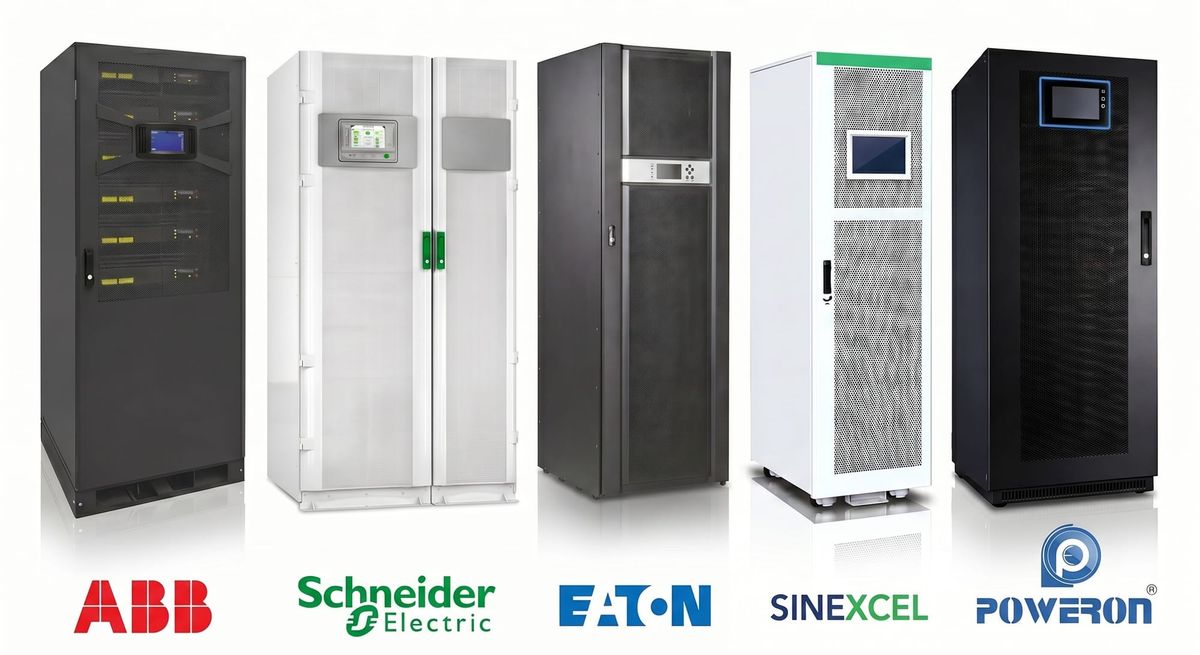
An uninterruptible power supply (UPS) keeps critical electrical loads running when the mains supply fails or misbehaves. The instant the power sags, dips or drops out, the UPS carries the load on its batteries — with no interruption to the equipment downstream — and holds it until the mains returns or a generator takes over. It also cleans up the everyday disturbances on the supply (voltage sags, surges and electrical noise) that quietly shorten the life of sensitive equipment.
Without one, an interruption lasting a fraction of a second is enough to crash a server, corrupt data, halt a production line, trip a PLC or reset a building's controls. For some facilities that is an inconvenience; for a hospital or a data centre it is a serious incident. That is why a UPS is standard wherever the cost of losing power — even briefly — outweighs the cost of protecting against it.
How it works, in one paragraph. In normal operation the power flows mains → UPS → critical load, with the UPS monitoring and conditioning it the whole time. The moment the mains fails or strays outside safe limits, the UPS draws from its battery through an inverter to hold the output steady. How continuously it does this is exactly what separates the three architectures below. And one thing to be clear about from the start: a UPS is designed to bridge an interruption — ride through a short outage, allow a safe shutdown, or hold the load until the standby generator starts. It is not meant to power a building for hours; sustained backup is the generator's job, which is why a UPS and a generator are usually designed together.
What a UPS protects
A UPS isn't for the whole building — it's for the critical load: equipment that must never lose power, even momentarily. Typically that means servers and network racks, PLCs and industrial controllers, medical equipment such as MRI and CT scanners and operating-theatre systems, lift and escalator controls, access control, CCTV and security, the building management system (BMS), telecom racks, and fire-alarm and life-safety systems. The first job in any UPS project is deciding which loads are genuinely critical — because that defines everything else.
Where UPS systems are used
The same need runs across sectors: hospitals and healthcare, data centres, telecom, airports, industrial and process plants, commercial and government buildings, and banks. If you recognise your facility here, the decisions below are the ones that determine what you need.
The three architectures
Most of the decision comes down to how critical the load is. Start there:
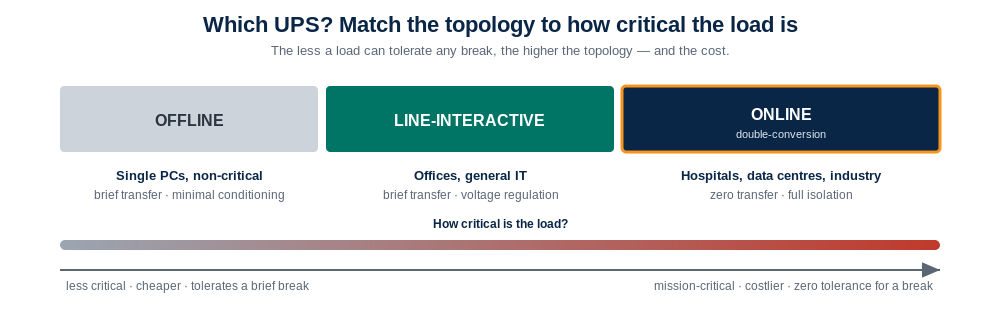
Pick by how critical the load is — the less it can tolerate a break, the higher the topology: offline for a PC, line-interactive for offices, online double-conversion for mission-critical loads.
The three types compared:
| Type | Transfer time | Voltage conditioning | Battery used in normal running? |
|---|---|---|---|
| Offline (standby) | Milliseconds | Minimal | No |
| Line-interactive | Milliseconds | Good (built-in AVR) | No |
| Online (double-conversion, VFI) | Zero (no break) | Excellent (full isolation) | Load always via inverter |
Offline (standby) runs the load off the mains and switches to battery on failure — cheapest, least conditioning, fine for a single PC. Line-interactive adds automatic voltage regulation to correct everyday sags and swells without using the battery — the workhorse for offices and general IT (compared in detail in Online vs Line-Interactive). Online double-conversion always runs the load off the inverter, giving effectively zero transfer time and full isolation from mains disturbances — the class for mission-critical, medical and data-centre loads, and the top tier (VFI) in IEC 62040-3. Match the architecture to how critical the load is, not to the price list.
Once you've chosen a topology, it's worth seeing why an online UPS holds its output without a break, while the other two switch to battery:
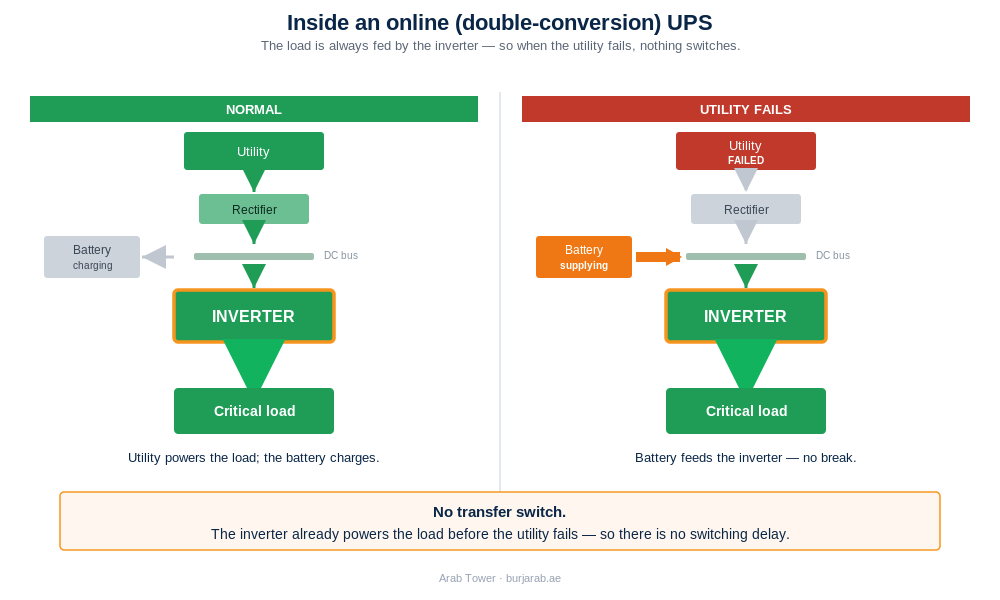
The online (double-conversion) case: the load always runs through the inverter, so there is no break when the utility fails. The offline and line-interactive types switch to battery instead — as in the table above.
A UPS is a system, not a box
Once the topology is settled, it's worth seeing the whole picture: a working installation is a complete system, not a single cabinet. It includes the UPS module, the battery bank (often in a dedicated, ventilated battery room or external cabinets), a maintenance bypass so the unit can be serviced without dropping the load, integration with the standby generator, and the cabling, protection and controls that tie it together — then commissioning, load testing and ongoing maintenance. Arab Tower designs, supplies, installs, tests, commissions and maintains the whole system, which is the difference between a UPS that is specified and one that performs for its full life.
Batteries — where the runtime and much of the cost live
The battery decides how long you keep running and carries much of the cost, weight and footprint. VRLA (sealed lead-acid) is the long-standing default: lower upfront cost, a three-to-five-year life, heat-sensitive (UAE plant rooms shorten it). Lithium costs more upfront but is increasingly chosen — for a much smaller footprint, faster recharge, far less maintenance, longer life (eight to ten years) and a lower lifetime cost (see VRLA vs Lithium Batteries).
Runtime — how long must it stay up?
The first question isn't "how big should the UPS be?" — it's "how long does the critical load need to stay operational?" Runtime is set by the battery, and the answer depends on what you're covering:
- ride through short dips and allow a clean shutdown — usually a few minutes;
- bridge to a generator starting — often a couple of minutes, then the genset takes the load;
- run through a longer outage with no generator — extended battery banks, where the battery becomes the biggest part of the cost and space.
Tell the supplier the load and the minutes (how that's calculated is in our UPS sizing guide).
One UPS, or several? Centralised vs distributed
A second architectural choice sits above the topology: protect everything from one central UPS, or place smaller distributed units near each load? A centralised system is easier to manage, maintain and back up with a generator — hospitals often centralise; offices and small sites often distribute; large data centres may use both. Larger and growing installations increasingly use modular UPS — power modules in one frame that you add to as the load grows, supporting redundancy (N+1) so the system rides through a module failure or maintenance. For any critical facility, redundancy is part of the design, not an afterthought.
A UPS only protects you if it's maintained
A UPS that isn't maintained is a false sense of security — most UPS-related outages trace to a neglected battery or unit, not to the original design. Batteries age and need testing and replacement; capacitors and fans wear; firmware needs updating; and the system should be load-tested and thermally inspected periodically (covered in UPS Maintenance). Specifying the install is only half the job; keeping it ready is the other half.
How to choose — the decision in five questions
- How critical is the load? This is the topology decision — use the spectrum above.
- How much real power (kW), not just kVA? Sizing is done in kW.
- How long must it run? Sizes the battery — and decides whether a generator belongs in the design.
- One central system or distributed units — and does it need redundancy (N+1)?
- What's the environment? A hot, dusty plant room changes the battery choice and the derating.
Where the standards fit
UPS systems are governed by the IEC 62040 series — 62040-1 (safety), 62040-2 (EMC) and 62040-3 (performance and test). It's 62040-3 that classifies behaviour, with online double-conversion as its top tier, VFI-SS-111. Specify the class, not a vague "online" — two units loosely called "online" can be built to very different standards.
Choosing the right UPS system
Most of the value in a UPS project is decided before anything is bought — in the architecture, the capacity, the battery technology and how the system is integrated, commissioned and maintained. Whether you're planning a new installation, upgrading an existing UPS, replacing batteries, integrating with standby generators or expanding capacity, our engineers can help you choose the correct topology, capacity, battery technology and architecture — then design, supply, install, test, commission and maintain the complete system, across the UAE and internationally.
Talk to our engineers → · or see our UPS systems.
Go deeper: How to Size a UPS · Online vs Line-Interactive · VRLA vs Lithium Batteries · UPS for Data Centres · UPS for Hospitals · UPS Maintenance.